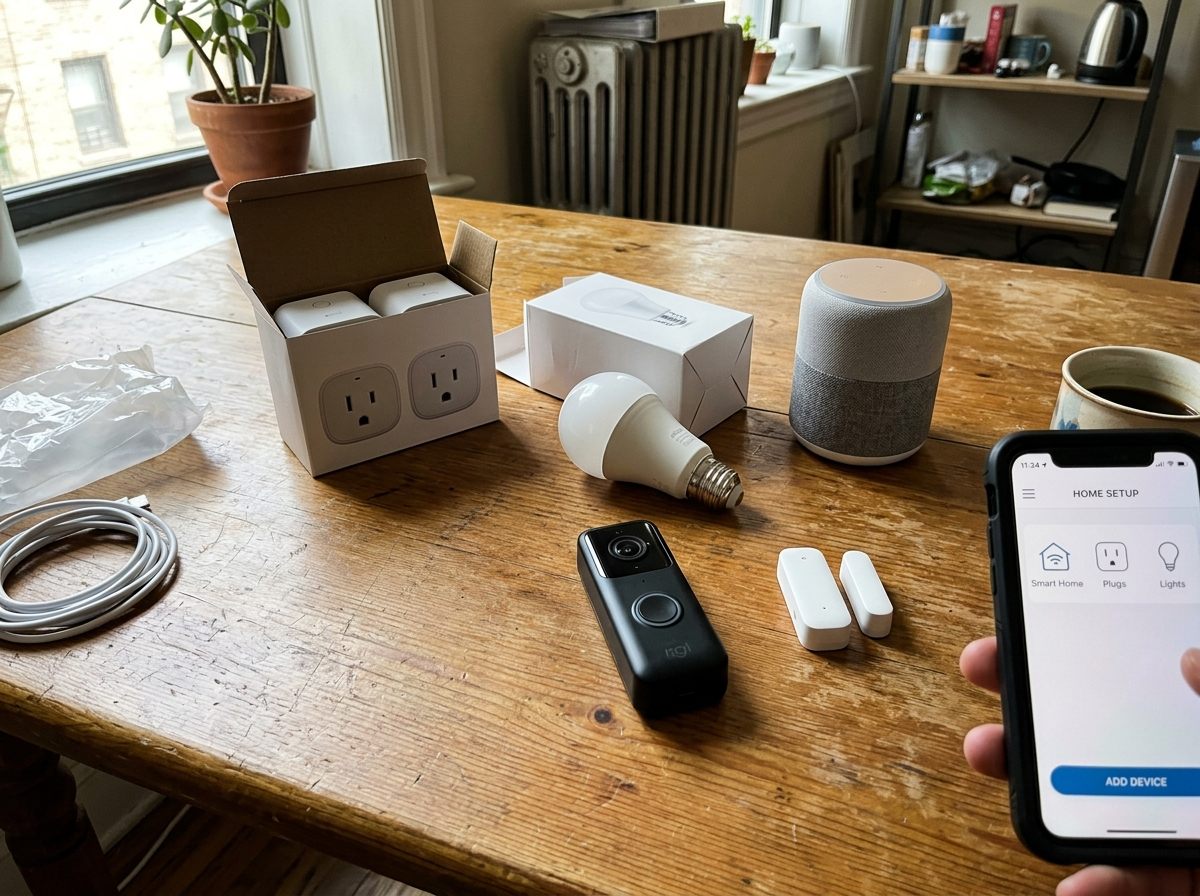
Every few months, one of us on the team moves into a new place, or a family member calls asking whether they should "do the smart home thing." The conversation usually goes the same way: they've seen the ads, they like the idea of turning off lights from bed, and they're vaguely curious about a video doorbell. But they don't want to drop $800 on a system they'll half-understand, they don't want to be locked into a subscription, and they definitely don't want to rewire anything.
That's a reasonable set of constraints. And the good news is that the $200 threshold buys you a genuinely useful setup — not a demo, not a gimmick, but something that changes a few daily habits for the better. We've assembled and lived with versions of this kit multiple times. Here's the configuration we'd recommend today, with a running tally so nothing sneaks up on you.
Do you actually need a dedicated hub?
Let's deal with this question upfront because it trips up a lot of first-timers. A dedicated hub — a separate device that sits on your network and acts as the central brain for all your smart devices — used to be non-negotiable. That's less true now. Most entry-level smart devices connect directly over Wi-Fi or Bluetooth, and a basic smart speaker or display is enough to tie them together through a free voice assistant platform.
The tradeoff is real, though. Devices that communicate over Wi-Fi add strain to your router, and if you eventually buy 20 or 30 devices, direct Wi-Fi connections can get unwieldy. For a starter kit of five to eight devices? You won't notice. A dedicated Zigbee or Z-Wave hub becomes worth considering once you're past roughly a dozen devices or if you want local-only control that doesn't depend on anyone's cloud staying up. For now, skip it.
The kit — with a running tally
1. A compact smart speaker or display — ~$40
Start here, not at the end. The smart speaker (or a small screen version if you'd rather see weather and timers at a glance) is your control hub. You'll use it to set up routines, give voice commands, and link your other devices. Entry-level options in this category have gotten genuinely good — the sound quality on a $40 unit isn't audiophile-grade, but it's perfectly fine for a kitchen or bedroom. The display version, often priced the same or within ten dollars, adds a clock face and a quick camera feed viewer, which earns its keep if you pair it near a front door.
Pick whichever voice assistant ecosystem you already use on your phone. Switching later is painful and largely unnecessary. One smart speaker is enough to start. You can always add a second in the bedroom once you're hooked.
Running total: $40
2. A two-pack of smart plugs — ~$25
Smart plugs are the fastest way to see smart home actually working, which matters when you're figuring out whether this is worth continuing. You plug them into a standard outlet, plug any existing lamp or appliance into them, and suddenly that lamp is schedulable, voice-controllable, and automatable. We use one on a floor lamp in the living room (set to turn on at sunset and off at 11pm) and one on a coffee maker (on at 6:45am, off after 90 minutes).
Two plugs for around $25 is the going rate for decent units. Skip anything priced below $10 per plug — the firmware update history on the budget-budget end is sparse, which matters for security. Look for plugs that show up natively in your chosen voice assistant's app without requiring a secondary manufacturer app to work. It's not universal, but it's increasingly common.
Running total: $65
3. A smart bulb starter pack — ~$35
A four-pack of white-spectrum smart bulbs (warm to cool, dimmable) covers most of a living room or bedroom. We deliberately recommend starting with white-only bulbs rather than the color-changing variety. Color bulbs cost significantly more, and most people use the color feature for about a week before defaulting to warm white forever. Save that money.
The more useful feature in a white-spectrum bulb is color temperature — being able to shift from a warm 2700K in the evening to a crisper 4000K during work hours. Pair that with a simple schedule or a sunrise routine and you'll actually notice the difference in how alert or relaxed you feel in a room. That's the kind of low-effort quality-of-life improvement that makes smart home feel worth it rather than frivolous.
One note: smart bulbs require that the wall switch stay in the on position. This annoys household members who don't know the system and will still flip the switch out of habit. A small adhesive switch cover or a smart switch cover (a physical add-on that blocks the rocker) solves this for about $6 and is worth buying at the same time.
Running total: $100
4. A budget video doorbell — ~$60
A wired or battery-powered video doorbell at the $60 price point gives you motion alerts, two-way audio, and a live feed you can pull up on your phone or smart display. That's the core use case — knowing who's at the door without getting up, and having a record if a package gets stolen.
At this price, you should expect: 1080p video, decent night vision, motion zones (so you're not getting pinged every time a car drives past), and some form of local or cloud clip storage. Where budget doorbells cut corners is in the cloud storage terms. Several manufacturers offer free clip storage for a limited window — usually three to seven days — before pushing you toward a paid plan. That window is genuinely sufficient for most people. You're not building a surveillance archive; you're just checking whether the UPS driver actually rang the bell.
"The doorbell was the one thing my partner actually noticed and used without me explaining anything. It just worked, and now they check the feed before they open the door every single time." — one of our editors, six months into the kit
Battery-powered models are simpler to install (no wiring, no chime integration to fuss with) and adequate for most situations. Wired models are better if you have existing doorbell wiring and want to skip the recharging cycle every few months. Either way, installation is a 20-minute job with a screwdriver.
Running total: $160
5. Two door or window contact sensors — ~$30
This is the component people underestimate most. Contact sensors are small magnetic pairs — one piece on the door or window frame, one on the door or window itself — that tell your system whether something is open or closed. They cost very little, install in minutes with adhesive strips, and enable some of the most genuinely useful automations.
A few things we actually use these for:
- A notification when the back door has been open for more than five minutes (useful if you have kids or a dog)
- An automation that turns on the kitchen light when the pantry door opens after sunset
- A simple alert if a door opens while everyone is supposed to be asleep
- Confirmation that the garage entry door actually closed — the thing you lie awake wondering about
Two sensors for around $30 is realistic. Buy them as a matched pair from the same manufacturer where possible, since cross-brand pairing in this category can be fussy.
Running total: $190
What to skip for now
We get asked about smart locks, whole-home audio, and high-end camera systems constantly. Here's our honest take on why none of them belong in a starter kit.
Smart locks
A smart lock that fails — due to a dead battery, a firmware glitch, or a connectivity dropout — locks you out of your own house. The peace of mind equation only works if you trust the product completely, and that trust is earned through familiarity with how the device behaves under stress. That's a year-two or year-three purchase, not a starter item. The upside (keyless entry, temporary codes for guests) is real but not urgent. The downside is also real and is literally being locked out of your home.
Whole-home systems and starter kits from camera brands
Several camera brands sell bundled "starter kits" that include a base station, multiple cameras, and a branded storage device. These are fine products. They are also ecosystem traps. Once you're three cameras deep into a proprietary system, you're buying that brand's cameras forever — or starting over. We've done both, and neither is fun. Start with one budget doorbell, learn what you actually want from a camera, and buy into a system deliberately after you have real-world data about your needs.
Smart thermostats (for now)
A smart thermostat is a legitimately good purchase — but not as your first smart home item. Installation involves your HVAC wiring, compatibility varies by system, and the payoff (energy savings, scheduling) takes months to materialize. It's a year-two addition that's better evaluated once you know whether you enjoy the smart home experience at all.
The privacy and security note you should actually read
Smart home devices are small computers on your network, and like any computer, they can be configured poorly or exploited if you ignore the basics. None of this is reason to avoid them — but it's reason to spend fifteen minutes on setup hygiene.
Three things we consider non-negotiable:
- Change the default password on every device and app immediately. Factory default credentials are published online. This is the single most common entry point for smart home intrusions, and it takes thirty seconds to fix.
- Put your smart devices on a separate Wi-Fi network (a guest network works). Most routers let you create a secondary network. If a smart plug or camera is ever compromised, it's isolated from your laptops, phones, and anything with your banking information on it. This takes about five minutes in your router settings.
- Understand what data leaves your home. Voice assistant devices send audio clips to cloud servers — that's how they process commands. Video doorbells send footage to manufacturer cloud storage. Most reputable manufacturers publish data retention policies and let you delete clips. Read the policy for anything you buy, specifically looking for whether your data is sold to third parties or shared with advertisers. If a device's privacy policy is hard to find, that's a signal.
The final tally and our verdict
Here's the full kit laid out cleanly:
- Compact smart speaker or display — ~$40
- Two-pack of smart plugs — ~$25
- Smart bulb starter pack (four-pack, white spectrum) — ~$35
- Budget video doorbell — ~$60
- Two contact/door sensors — ~$30
Total: ~$190 — leaving ten dollars of buffer for a switch cover or a spare adhesive mount.
This kit does something that's easy to underestimate: it makes your home respond to you without requiring you to think about it. After a week or two, the lights coming on at sunset and the notification when the front door opens stop feeling like technology and start feeling like the house just working correctly. That's the actual promise of smart home — not novelty, but a few small frictions quietly removed.
Start here. Live with it for six months. By then you'll have a clear sense of which direction you want to go next — whether that's more automations, a second room, or a proper camera setup. But you won't have spent $800 figuring that out, and you won't be stuck in an ecosystem you regret.